NFC & QR CODE MARKETING

Customer Engagement Starts With a Tap or Scan

Turn the checkout counter into a customer engagement channel.

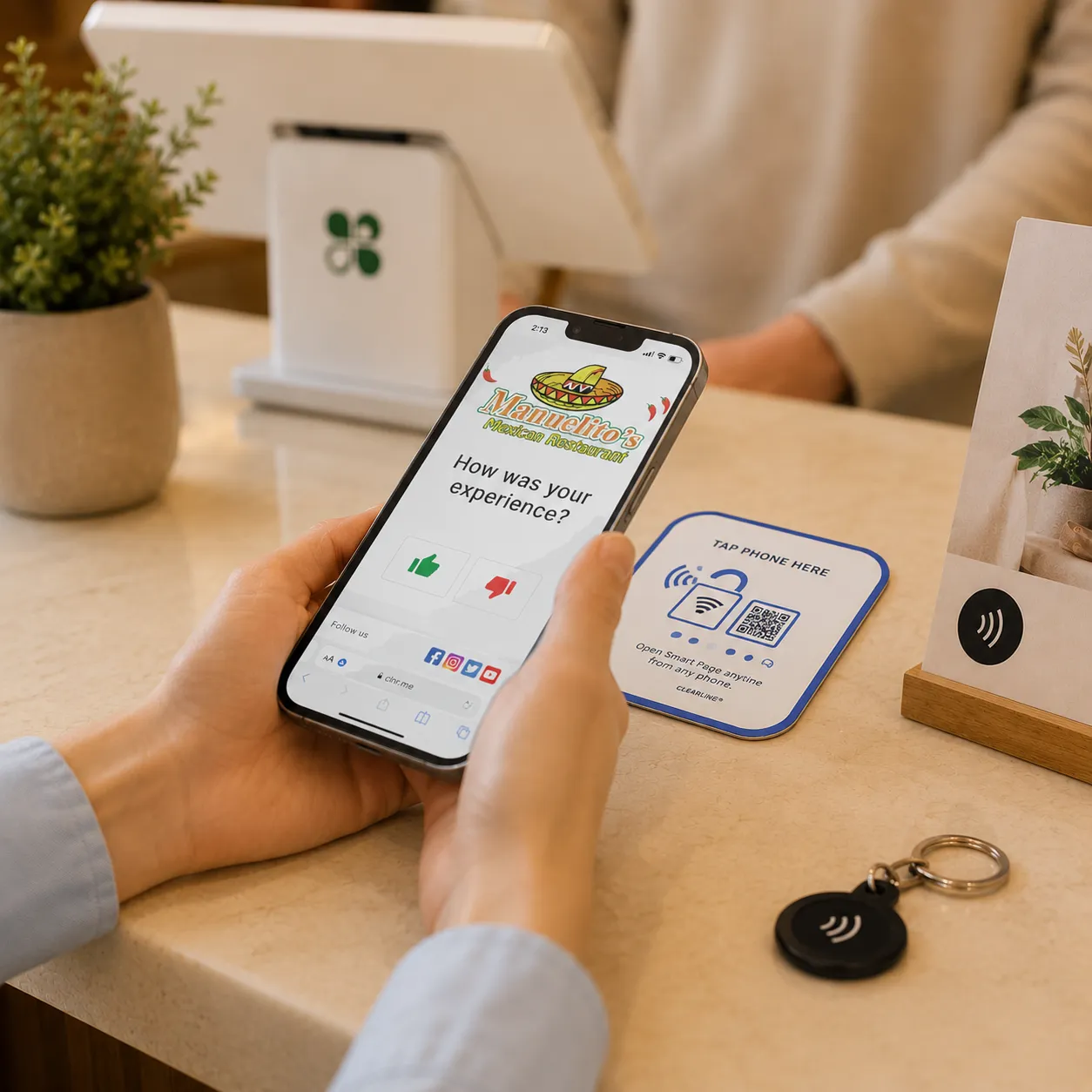
POS Marketing NFC & QR products turn counters, doors, tables, windows, receipts, displays and other physical touchpoints into instant digital marketing experiences.

POS Marketing NFC & QR products let customers instantly connect with a merchant by simply tapping their smartphone or scanning a QR code. .

No app. No searching. No typing a URL.

Just Tap and Connect.

HOW IT WORKS AT THE MERCHANT LOCATION

From Installation to Engagement in Four Steps

Easy to use and easy to manage

Set it up once.
Let every tap or scan do the work.

FROM PHYSICAL TO DIGITAL IN ONE TAP OR SCAN

Phygital marketing (physical & digital)

Put Marketing Wherever Your Customers Are

Place NFC & QR products throughout the business and give customers an easy way to take the next action.

A single tap or scan can connect customers to a branded Smart Page where they can interact with the merchant. 

  • TAP – Customers hold their NFC-enabled smartphone near the product.
  • OR SCAN – Customers scan the QR code using their phone camera.
  • CONNECT – The merchant’s branded Smart Page opens instantly.

The customer chooses what they want to do next.

TURN MORE OF THE BUSINESS INTO MARKETING

The Customer Relationship Doesn't Have to End at the POS

The POS screen is one opportunity to engage.

The receipt is another.

The counter is another.

The counter is another.

The front door is another.

Delivery label is another

POS Marketing NFC & QR products connect those physical moments to digital customer engagement.

EDITABLE, TRACKABLE AND EASY TO USE

MORE THAN A STATIC QR CODE

Change it any Time!

Traditional printed QR codes often point to one fixed destination.POS Marketing products connect the physical NFC and QR experience to a managed digital marketing destination.

Change the offer.

Update a review destination.

Add a social channel.

Promote a new campaign.

Launch a seasonal promotion.

Update links, offers, images, and other Smart Page content without reprinting or physically replacing the stand or sticker.

ONE PAGE, EVERY WAY TO CONNECT

Meet the Smart Marketing Page

Give every merchant one branded digital destination that turns customer attention into action. Easily add branded content and enable or disable marketing modules (smart page apps) via an online dashboard. The merchant is in full control of the page visual appearance and marketing content.

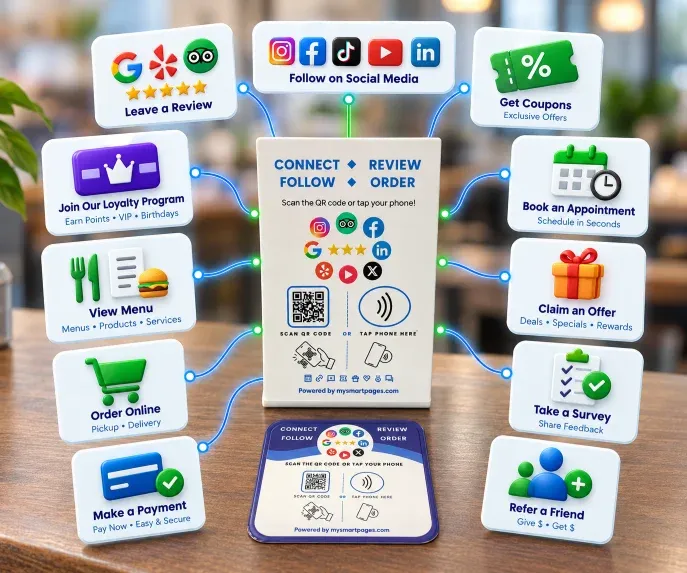
Customers can instantly:

Our Smart Page has everything customers need in one place. It’s simple, fast and it works.

-Jane's Coffee House

More Ways to Connect

ONE SMART PAGE. MANY ACTIONS.

Every product connects customers to a custom Smart Page that brings merchant’s most important digital destinations in one place.

Customers can:

  • Leave a Review

  • Follow on Social Media 

  • Claim an Offer — 

  • Join a Customer Program

  • View a Menu or Catalog 

  • Book an Appointment 

  • Order Online

  • Make a Payment

  •  Take a Survey 

CONNECT ANYWHERE - CONNECT WHEN IT MATTERS

WHERE ENGAGEMENT HAPPENS

Marketing Beyond the POS

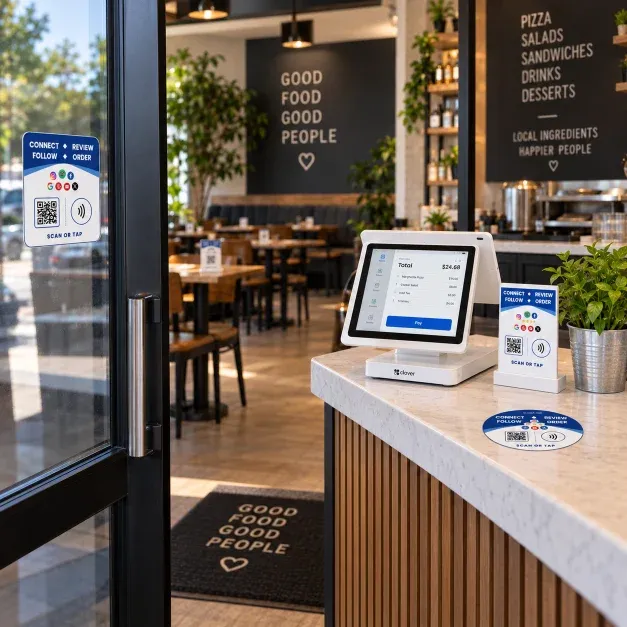
AT THE CHECKOUT – Place a Smart Stand next to the POS and give customers another way to review, follow, join or claim an offer.

ON THE COUNTER – Use NFC & QR stickers to create permanent customer engagement points without taking up counter space.

ON THE DOOR OR WINDOW – Connect customers before they enter or after they leave.

AT THE TABLE – Restaurants can connect guests to menus, reviews, offers and social channels.

ON PRODUCT DISPLAYS – Connect shoppers to product information, promotions, reviews or other digital content.

ON PRINTED MATERIALS – Extend campaigns across receipts, flyers, signage and other physical marketing materials.

Built for Partners - Clover's ISOs and Agents

Your Merchants. Your Relationship. Our Technology.

POS Marketing gives Clover ISOs, processors and agents a ready-to-deploy solution that can become part of your existing merchant offering.

Differentiate Your Offering

Give merchants another reason to choose you over competing Clover providers.

Create New Revenue

Expand beyond processing with additional software and marketing products.

Sell More

Give your sales team practical products they can introduce to new and existing merchants.

Improve Retention

Become more valuable to merchants by helping them with more than payment processing.

Expand Over Time

Start with the products merchants need today and introduce morel tools as their business grows.

Be a Modern ISO

Differentiate your offering Give merchants more than payment processing, give them growth tools.

Frequently Asked Questions

Got Questions About POS Marketing?

BOTH, IT’S BUILT FOR ISOs TO SUPPORT THEIR MERCHANTS.

PRIVATE APP DISTRIBUTION

POS Marketing Clover apps can be distributed directly through participating ISO partners.

GUIDED ONBOARDING

A step-by-step onboarding process helps merchants get activated quickly.

MERCHANT SUPPORT

We support merchants throughout setup and ongoing use.

CENTRALIZED MANAGEMENT

ISOs can manage merchant accounts and deployment from one partner platform.

Easy to sell. Easy to deploy. Easy to scale.

Give your merchants more than a POS.

Bundle customer engagement, reviews and marketing into the merchant relationship — and give them another reason to stay with your ISO.

Become a POS Marketing Partner.

POS Marketing helps ISOs bundle customer engagement tools directly with Clover POS — giving merchants more value without requiring them to search for, purchase, and manage multiple marketing apps.

From private app invitation to merchant activation, we make deployment simple.

You bring the merchant. We make activation simple.

1. INVITE THE MERCHANT

Create the merchant from your POS Marketing partner dashboard and send a secure invitation.

You invite. We handle the rest.

2. MERCHANT ACCEPTS THE INVITATION

The merchant receives an onboarding email with a secure link to begin setup.

Simple. Fast. One click to get started.

3. CONNECT CLOVER

The merchant signs in to their Clover Dashboard and authorizes the connection between their Clover account and the POS Marketing platform.

Secure connection to the merchant’s existing Clover account.

4. INSTALL THE PRIVATE CLOVER APP

The merchant accesses the POS Marketing app made available through the ISO invitation and installs it on their Clover account.

Private app distribution. No need to search the public Clover App Market.

5. COMPLETE ONBOARDING

The merchant confirms their business information and configures the marketing experience.

Depending on the solution, setup may include:

  • Business name, logo and branding

  • Review destinations

  • Social media links

  • Smart Page content

  • Offers and calls to action

  • Menu or ordering links

  • Customer engagement preferences

Quick setup designed for small businesses.

6. START ENGAGING CUSTOMERS

Once activated, POS Marketing begins turning Clover transactions and in-store touchpoints into customer engagement opportunities.

Merchants can drive:

More Reviews • More Engagement • More Loyalty • More Revenue

AUTOMATED MARKETING AT THE POINT OF SALE

The merchant processes the transaction normally. No additional employee action is required.

After checkout, POS Marketing can automatically present a customer call to action on the Clover customer-facing screen, connected marketing display, receipt, or other engagement touchpoint.

Depending on the merchant’s solution, customers can:

  • Leave a review

  • Follow the business on social media

  • View the merchant Smart Page

  • Take a survey

  • View a menu or place an order

  • Join a loyalty or VIP program

  • View an offer or promotion

  • Connect with the business after the visit

Set it up once. Let every transaction do the work.

FROM COMPLETED TRANSACTION TO REVIEW OPPORTUNITY — AUTOMATICALLY

BEFORE THE TRANSACTION

Merchant promotions or branded content can appear on the customer-facing display.

TRANSACTION COMPLETED

The merchant processes the sale normally. No extra cashier steps are required.

REVIEW REQUEST APPEARS

A QR code automatically appears after checkout and can also be available on the customer receipt.

CUSTOMER SCANS & REVIEWS

The customer scans the QR code with their smartphone and reaches the merchant’s review experience.

No customer mobile app is required.

CHOOSE REVIEW DESTINATIONS

Select the review platforms that matter most to the business, including Google, Yelp, Facebook and many others, we support over 40+ review platforms. 

CUSTOMIZE THE EXPERIENCE

Personalize branding, messaging, Smart Pages and calls to action.

TRACK RESULTS

Monitor customer engagement and activity across merchant locations from one dashboard.

REVIEW REQUEST APP

Turn every completed transaction into a review opportunity.

CUSTOMER BRIDGE APP

Give customers more ways to connect through reviews, social media, Smart Pages, surveys, menus and ordering.

NFC + QR PRODUCTS

Extend engagement beyond the Clover screen with tap-and-scan touchpoints at the counter, entrance, table, window or checkout.

MARKETING SCREEN

Add a customer-facing marketing screen to display promotions, offers, announcements and post-transaction calls to action.

Once the partner account and offering are configured, merchants can be invited and activated through the guided onboarding process. The goal is to make deployment simple enough to scale across an ISO merchant portfolio.

POS Marketing allows you to offer more than payments and hardware. By bundling marketing tools with Clover, you can differentiate your offering, strengthen merchant relationships, improve retention and create new recurring revenue opportunities.

Merchants gain easy-to-use tools designed to help generate more reviews, engage customers, strengthen their online presence and encourage repeat business — all connected to the point-of-sale experience they already use.

The ISO sends the merchant a private invitation. The merchant accepts the invitation, signs in to their Clover Dashboard, connects their Clover account, installs the invited app and completes the guided onboarding process.

No. POS Marketing apps can be distributed privately through participating ISO partners, allowing the ISO to control the merchant relationship and deployment process.

When the ISO includes POS Marketing as part of its merchant offering, participating apps can be provided to the merchant at no additional app fee. The specific merchant package is determined by the ISO.

Clover apps. Review Request and Customer Bridge work with supported Clover devices.

Optional NFC/QR products and Marketing Screens can be added to create additional customer engagement touchpoints.

No additional cashier action is required for automated post-transaction experiences. The merchant processes the transaction

No additional cashier action is required for automated post-transaction experiences. The merchant processes the transaction

Yes. NFC and QR solutions can operate as standalone engagement tools without a Clover app. Marketing screens can also be used with compatible internet-connected displays.